$ scripts --run conversion-drop-monitor
Conversion Drop Monitor
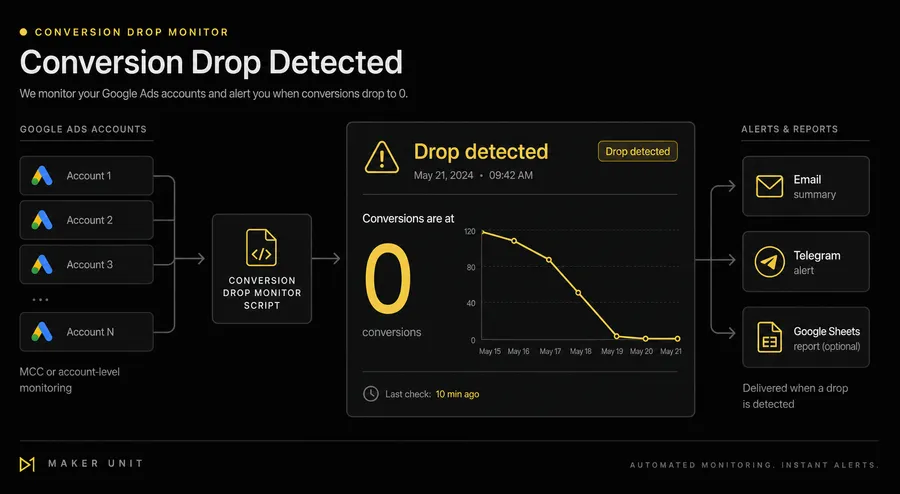
A Google Ads Script that alerts you when conversions drop to zero — across MCC accounts or in a standalone setup. Catches tracking failures, paused campaigns, and budget exhaustion before your clients do.
What this script does
- Queries each monitored account for conversion totals over a configurable recent period (default: last 3 days).
- Compares against a baseline period (default: last 14 days) to distinguish a real drop from a new account with no history.
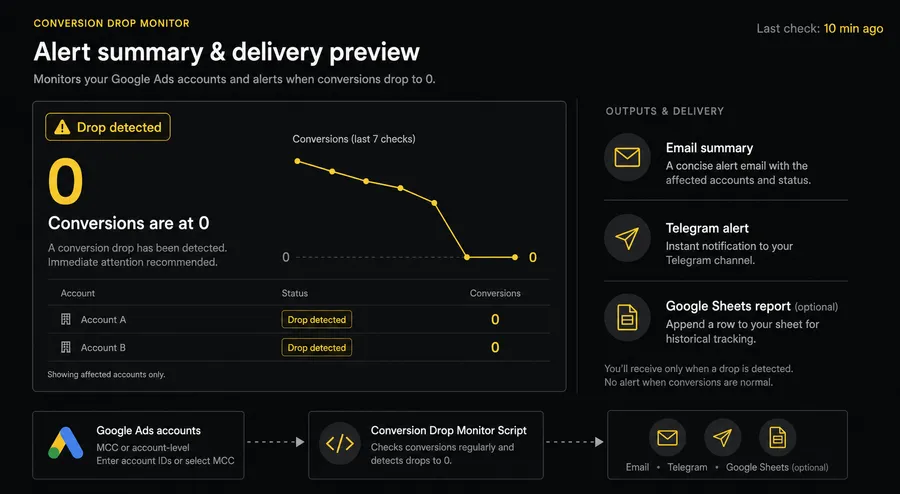
- Sends a FIRST_ALERT email or Telegram message when zero conversions are detected.
- Follows up automatically after a configurable interval (default: 7 days) if conversions are still zero.
- Sends a FINAL_ALERT and suspends monitoring after two follow-up checks without recovery — preventing alert fatigue.
- Detects RECOVERY and sends a notification when conversions return.
- Stores state in Google Ads Script Properties — survives script re-runs and quota resets.
- Works in MCC mode (monitors a list of child accounts) and standalone mode (monitors the current account).
Alert stages
| Stage | Trigger | Action |
|---|---|---|
| FIRST_ALERT | Zero conversions in the recent period | Sends alert, schedules first follow-up |
| FOLLOW_UP_ALERT × 2 | Still zero after follow-up interval | Sends follow-up, schedules next check |
| FINAL_ALERT | Still zero after both follow-ups | Sends final alert, suspends monitoring |
| RECOVERY | Conversions return at any stage | Sends recovery notice, resets state |
Setup
- 1 Download the script file below.
- 2 Open Google Ads → Tools → Scripts (or in MCC: MCC Scripts).
- 3 Click New script, paste the entire file content.
- 4 In the CONFIG block at the top, set ACCOUNT_IDS to your Google Ads customer IDs (10-digit format).
- 5 Set EMAIL_RECIPIENTS to one or more recipient addresses.
- 6 Optionally configure TELEGRAM_BOT_TOKEN and TELEGRAM_CHAT_ID if you prefer Telegram alerts.
- 7 Run in TEST_MODE: true first to verify the alert format without saving state.
- 8 Schedule the script to run weekly (recommended: Monday 09:00 in your account timezone).
- 9 Set RECENT_PERIOD_DAYS and BASELINE_PERIOD_DAYS to match your conversion volume — accounts with fewer than one conversion per week need a wider recent period.
Key CONFIG options
ACCOUNT_IDS string[] Google Ads customer IDs to monitor. Format: '123-456-7890'. In standalone mode, must include the current account's ID.
RECENT_PERIOD_DAYS number How many calendar days to check for zero conversions. Default: 3. Increase for accounts with low weekly conversion volume.
BASELINE_PERIOD_DAYS number Earlier period used for comparison in alert context. Default: 14.
FOLLOW_UP_INTERVAL_DAYS number Days to wait between follow-up checks after the first alert. Default: 7.
EMAIL_ENABLED / EMAIL_RECIPIENTS boolean / string[] Toggle email alerts and set recipient addresses.
TELEGRAM_ENABLED / TELEGRAM_BOT_TOKEN / TELEGRAM_CHAT_ID boolean / string / string Toggle Telegram alerts. Requires a bot token and chat ID — set these only in your private Google Ads copy, never share publicly.
ALERT_GROUPING 'summary' | 'per_account' summary sends one email per script run. per_account sends one email per alerted account.
TEST_MODE boolean Set to true to send test alerts without saving state. Use for initial verification. Default: false.
Script code
'use strict';
const CONFIG = {
// Add every Google Ads Customer ID that this script is allowed to monitor.
ACCOUNT_IDS: ['123-456-7890'],
// Add an account ID here for one run to clear its saved alert state, then remove it.
RESUME_ACCOUNT_IDS: [],
// Set how many calendar days to check, including today.
RECENT_PERIOD_DAYS: 3,
// Set how many earlier calendar days to show for comparison.
BASELINE_PERIOD_DAYS: 14,
// Set how many days to wait between follow-up checks.
FOLLOW_UP_INTERVAL_DAYS: 7,
// Keep two follow-up checks before the final alert and automatic suspension.
MAX_FOLLOW_UP_CHECKS: 2,
// Choose the Google Ads conversion metric; this version supports only 'conversions'.
CONVERSION_METRIC: 'conversions',
// Set to true to send Email alerts or false to disable Email.
EMAIL_ENABLED: true,
// Add one or more Email addresses that should receive alerts.
EMAIL_RECIPIENTS: ['[email protected]'],
// Set to true only after Telegram credentials have been added and tested.
TELEGRAM_ENABLED: false,
// Paste the Telegram bot token here only in your private Google Ads copy.
TELEGRAM_BOT_TOKEN: '',
// Paste the Telegram chat ID here only in your private Google Ads copy.
TELEGRAM_CHAT_ID: '',
// Use 'summary' for one Email per run or 'per_account' for one Email per account.
ALERT_GROUPING: 'summary',
// Set to true for safe test alerts without saving state; set to false for normal alerts with saved state.
TEST_MODE: false,
// Set the sender and product name shown in notifications.
BRAND_NAME: 'Maker Unit',
// Set the branded website link shown in notifications.
BRAND_URL: 'https://maker-unit.com/'
};
function normalizeCustomerId(value) {
return String(value == null ? '' : value).replace(/[\s-]/g, '');
}
function normalizeCustomerIdList(values, settingName, allowEmpty) {
if (!Array.isArray(values) || (!allowEmpty && values.length === 0)) {
throw new Error(settingName + ' must contain at least one Customer ID.');
}
return values.map(function (value) {
const normalized = normalizeCustomerId(value);
if (!/^\d{10}$/.test(normalized)) {
throw new Error(settingName + ' contains an invalid Customer ID.');
}
return normalized;
});
}
function requirePositiveInteger(config, settingName) {
if (!Number.isInteger(config[settingName]) || config[settingName] <= 0) {
throw new Error(settingName + ' must be a positive integer.');
}
}
function validateConfig(config) {
const accountIds = normalizeCustomerIdList(config.ACCOUNT_IDS, 'ACCOUNT_IDS', false);
const resumeAccountIds = normalizeCustomerIdList(
config.RESUME_ACCOUNT_IDS,
'RESUME_ACCOUNT_IDS',
true
);
requirePositiveInteger(config, 'RECENT_PERIOD_DAYS');
requirePositiveInteger(config, 'BASELINE_PERIOD_DAYS');
requirePositiveInteger(config, 'FOLLOW_UP_INTERVAL_DAYS');
if (config.MAX_FOLLOW_UP_CHECKS !== 2) {
throw new Error('MAX_FOLLOW_UP_CHECKS must equal 2.');
}
if (config.CONVERSION_METRIC !== 'conversions') {
throw new Error('CONVERSION_METRIC must be conversions.');
}
if (config.ALERT_GROUPING !== 'summary' && config.ALERT_GROUPING !== 'per_account') {
throw new Error('ALERT_GROUPING must be summary or per_account.');
}
if (config.EMAIL_ENABLED && (
!Array.isArray(config.EMAIL_RECIPIENTS) ||
config.EMAIL_RECIPIENTS.length === 0 ||
config.EMAIL_RECIPIENTS.some(function (recipient) {
return typeof recipient !== 'string' || recipient.trim() === '';
})
)) {
throw new Error('EMAIL_RECIPIENTS must contain at least one recipient when Email is enabled.');
}
if (config.TELEGRAM_ENABLED && (
typeof config.TELEGRAM_BOT_TOKEN !== 'string' ||
config.TELEGRAM_BOT_TOKEN.trim() === '' ||
typeof config.TELEGRAM_CHAT_ID !== 'string' ||
config.TELEGRAM_CHAT_ID.trim() === ''
)) {
throw new Error('TELEGRAM configuration is incomplete.');
}
return { accountIds, resumeAccountIds };
}
function parseYmdUtc(value) {
const match = /^(\d{4})-(\d{2})-(\d{2})$/.exec(value);
if (!match) {
throw new Error('todayYmd must use YYYY-MM-DD format.');
}
const timestamp = Date.UTC(Number(match[1]), Number(match[2]) - 1, Number(match[3]));
const date = new Date(timestamp);
if (
date.getUTCFullYear() !== Number(match[1]) ||
date.getUTCMonth() !== Number(match[2]) - 1 ||
date.getUTCDate() !== Number(match[3])
) {
throw new Error('todayYmd must be a valid calendar date.');
}
return timestamp;
}
function formatYmdUtc(timestamp) {
return new Date(timestamp).toISOString().slice(0, 10);
}
function buildDateRanges(todayYmd, recentDays, baselineDays) {
const oneDayMs = 24 * 60 * 60 * 1000;
const today = parseYmdUtc(todayYmd);
const recentStart = today - (recentDays - 1) * oneDayMs;
const baselineEnd = recentStart - oneDayMs;
const baselineStart = baselineEnd - (baselineDays - 1) * oneDayMs;
return {
recent: { start: formatYmdUtc(recentStart), end: formatYmdUtc(today) },
baseline: { start: formatYmdUtc(baselineStart), end: formatYmdUtc(baselineEnd) }
};
}
function addDaysYmd(value, days) {
return formatYmdUtc(parseYmdUtc(value) + days * 24 * 60 * 60 * 1000);
}
function isValidYmd(value) {
try {
parseYmdUtc(value);
return true;
} catch (error) {
return false;
}
}
function normalizeStoredState(state, maxFollowUps) {
if (!state || typeof state !== 'object') {
return null;
}
if (
state.status === 'WAITING_FOLLOW_UP' &&
Number.isInteger(state.followUpCount) &&
state.followUpCount >= 0 &&
state.followUpCount < maxFollowUps &&
typeof state.nextCheckDate === 'string' &&
isValidYmd(state.nextCheckDate)
) {
return {
status: state.status,
followUpCount: state.followUpCount,
nextCheckDate: state.nextCheckDate
};
}
if (
state.status === 'SUSPENDED' &&
Number.isInteger(state.followUpCount) &&
state.followUpCount >= maxFollowUps &&
typeof state.suspendedAt === 'string'
) {
return {
status: state.status,
followUpCount: state.followUpCount,
suspendedAt: state.suspendedAt
};
}
return null;
}
function evaluateAccount(input) {
const followUpDays = input.followUpDays || CONFIG.FOLLOW_UP_INTERVAL_DAYS;
const maxFollowUps = input.maxFollowUps || CONFIG.MAX_FOLLOW_UP_CHECKS;
const state = normalizeStoredState(input.state, maxFollowUps);
if (state && state.status === 'SUSPENDED') {
return { action: 'SKIP_SUSPENDED', nextState: state };
}
if (state && input.now < state.nextCheckDate) {
return { action: 'SKIP_UNTIL', nextState: state };
}
if (typeof input.recentConversions !== 'number' || input.recentConversions < 0) {
throw new Error('recentConversions must be a non-negative number when an account is due.');
}
if (input.recentConversions > 0) {
return state
? { action: 'RECOVERY', nextState: null }
: { action: 'NONE', nextState: null };
}
if (!state) {
return {
action: 'FIRST_ALERT',
nextState: {
status: 'WAITING_FOLLOW_UP',
followUpCount: 0,
nextCheckDate: addDaysYmd(input.now, followUpDays)
}
};
}
const followUpCount = state.followUpCount + 1;
if (followUpCount >= maxFollowUps) {
return {
action: 'FINAL_ALERT',
nextState: { status: 'SUSPENDED', followUpCount, suspendedAt: input.now }
};
}
return {
action: 'FOLLOW_UP_ALERT',
nextState: {
status: 'WAITING_FOLLOW_UP',
followUpCount,
nextCheckDate: addDaysYmd(input.now, followUpDays)
}
};
}
function formatCustomerId(value) {
const normalized = normalizeCustomerId(value);
return normalized.replace(/^(\d{3})(\d{3})(\d{4})$/, '$1-$2-$3');
}
function classifyContext(recent, baseline, enabledCampaigns) {
const hasTraffic = Number(recent.cost) > 0 || Number(recent.clicks) > 0;
const trafficContext = hasTraffic
? 'Traffic exists with zero conversions: possible tracking or traffic quality issue.'
: 'No recent traffic: campaigns may be paused, not delivering, or unfunded.';
const historyContext = Number(baseline.conversions) > 0
? 'Recent disappearance after baseline conversions.'
: 'Prolonged inactivity with zero baseline conversions.';
const campaignContext = ' Enabled campaigns: ' + Number(enabledCampaigns || 0) + '.';
return trafficContext + ' ' + historyContext + campaignContext;
}
function copyMetrics(metrics) {
return {
start: metrics.start,
end: metrics.end,
cost: Number(metrics.cost),
clicks: Number(metrics.clicks),
conversions: Number(metrics.conversions)
};
}
function buildNotificationModel(accountResult, decision, config) {
const nextState = decision.nextState;
return {
accountName: String(accountResult.accountName),
customerId: formatCustomerId(accountResult.customerId),
normalizedCustomerId: normalizeCustomerId(accountResult.customerId),
currencyCode: String(accountResult.currencyCode),
timeZone: String(accountResult.timeZone),
enabledCampaigns: Number(accountResult.enabledCampaigns),
recent: copyMetrics(accountResult.recent),
baseline: copyMetrics(accountResult.baseline),
recentDays: Number(config.RECENT_PERIOD_DAYS),
baselineDays: Number(config.BASELINE_PERIOD_DAYS),
stage: decision.action,
status: nextState ? nextState.status : 'HEALTHY',
nextCheckDate: nextState && nextState.nextCheckDate ? nextState.nextCheckDate : null,
suspendedAt: nextState && nextState.suspendedAt ? nextState.suspendedAt : null,
context: classifyContext(accountResult.recent, accountResult.baseline, accountResult.enabledCampaigns),
isTest: Boolean(config.TEST_MODE),
brandName: String(config.BRAND_NAME),
brandUrl: String(config.BRAND_URL)
};
}
function formatNumber(value) {
return Number.isInteger(value) ? String(value) : String(Number(value));
}
function formatCost(value, currencyCode) {
return currencyCode + ' ' + Number(value).toFixed(2);
}
function stateLabel(model) {
if (model.status === 'SUSPENDED') {
return 'SUSPENDED' + (model.suspendedAt ? ' since ' + model.suspendedAt : '');
}
if (model.nextCheckDate) {
return model.status + '; next check: ' + model.nextCheckDate;
}
return model.status;
}
function formatModelLines(model) {
return [
'Account: ' + model.accountName,
'Customer ID: ' + model.customerId,
'Currency: ' + model.currencyCode,
'Time zone: ' + model.timeZone,
'Stage: ' + model.stage,
'State: ' + stateLabel(model),
'Recent ' + model.recent.start + ' to ' + model.recent.end + ' (' + model.recentDays + ' days): cost ' +
formatCost(model.recent.cost, model.currencyCode) + ', clicks ' +
formatNumber(model.recent.clicks) + ', conversions ' + formatNumber(model.recent.conversions),
'Baseline ' + model.baseline.start + ' to ' + model.baseline.end + ' (' + model.baselineDays + ' days): cost ' +
formatCost(model.baseline.cost, model.currencyCode) + ', clicks ' +
formatNumber(model.baseline.clicks) + ', conversions ' + formatNumber(model.baseline.conversions),
'Enabled campaigns: ' + model.enabledCampaigns,
'Context: ' + model.context,
model.brandName + ': ' + model.brandUrl
];
}
function escapeHtml(value) {
return String(value)
.replace(/&/g, '&')
.replace(/</g, '<')
.replace(/>/g, '>')
.replace(/"/g, '"')
.replace(/'/g, ''');
}
function subjectForModel(model) {
const prefix = model.isTest ? '[TEST] ' : '';
return prefix + 'Google Ads Alert - Conversion Drop Monitor - ' +
model.stage + ' - ' + model.accountName;
}
function htmlFromLines(lines, brandUrl) {
const escaped = lines.map(escapeHtml);
const safeUrl = escapeHtml(brandUrl);
const firstAlertStageIndex = lines.indexOf('Stage: FIRST_ALERT');
if (firstAlertStageIndex >= 0) {
escaped[firstAlertStageIndex] = 'Stage: <span style="color: #b91c1c; font-weight: 700;">FIRST_ALERT</span>';
}
escaped[escaped.length - 1] = '<a href="' + safeUrl + '">' + escaped[escaped.length - 1] + '</a>';
return '<div>' + escaped.join('<br>') + '</div>';
}
function formatEmailPerAccount(model) {
const lines = formatModelLines(model);
return {
subject: subjectForModel(model),
body: lines.join('\n'),
htmlBody: htmlFromLines(lines, model.brandUrl)
};
}
function formatEmailSummary(models, runSummary, config) {
const ordered = models.slice().sort(function (left, right) {
return left.normalizedCustomerId.localeCompare(right.normalizedCustomerId);
});
const testPrefix = config.TEST_MODE ? '[TEST] ' : '';
const header = [
'Conversion Drop Monitor summary',
'Processed: ' + Number(runSummary.processed || 0) + '; errors: ' +
(Array.isArray(runSummary.errors) ? runSummary.errors.length : Number(runSummary.errors || 0))
];
const sections = ordered.map(function (model) {
return formatModelLines(model).join('\n');
});
const body = header.concat(sections).join('\n\n');
const htmlSections = ordered.map(function (model) {
return htmlFromLines(formatModelLines(model), model.brandUrl);
});
const subjectContext = ordered.length === 1
? ordered[0].accountName
: ordered.length + ' accounts';
return {
subject: testPrefix + 'Google Ads Alert - Conversion Drop Monitor summary - ' + subjectContext,
body,
htmlBody: '<div>' + header.map(escapeHtml).join('<br>') + '</div><hr>' + htmlSections.join('<hr>')
};
}
function formatTelegram(model) {
const stageLabel = String(model.stage).replace(/_/g, ' ');
const indicator = model.stage === 'RECOVERY' ? '🟢' : '🔴';
const statusLine = model.nextCheckDate
? 'Next check: ' + model.nextCheckDate
: 'State: ' + stateLabel(model);
const context = String(model.context).replace(/ Enabled campaigns: \d+\.$/, '');
return [
indicator + ' <b>' + escapeHtml(stageLabel) + '</b>',
'',
'<b>' + escapeHtml(model.accountName) + '</b>',
'Customer ID: ' + escapeHtml(model.customerId),
'',
'📊 <b>RECENT · ' + escapeHtml(model.recentDays) + ' DAYS</b>',
escapeHtml(model.recent.start) + ' → ' + escapeHtml(model.recent.end),
'Cost: ' + escapeHtml(formatCost(model.recent.cost, model.currencyCode)),
'Clicks: ' + escapeHtml(formatNumber(model.recent.clicks)),
'Conversions: ' + escapeHtml(formatNumber(model.recent.conversions)),
'',
'📊 <b>BASELINE · ' + escapeHtml(model.baselineDays) + ' DAYS</b>',
escapeHtml(model.baseline.start) + ' → ' + escapeHtml(model.baseline.end),
'Cost: ' + escapeHtml(formatCost(model.baseline.cost, model.currencyCode)),
'Clicks: ' + escapeHtml(formatNumber(model.baseline.clicks)),
'Conversions: ' + escapeHtml(formatNumber(model.baseline.conversions)),
'',
'⚙️ <b>STATUS</b>',
'Enabled campaigns: ' + escapeHtml(model.enabledCampaigns),
escapeHtml(statusLine),
'',
'ℹ️ <b>CONTEXT</b>',
escapeHtml(context)
].join('\n');
}
function detectEnvironment(globals) {
return globals && typeof globals.AdsManagerApp !== 'undefined' ? 'MCC' : 'STANDALONE';
}
function validateQueryRange(range) {
const start = parseYmdUtc(range.start);
const end = parseYmdUtc(range.end);
if (start > end) {
throw new Error('Date range start must not be after end.');
}
}
function queryPeriodMetrics(range) {
validateQueryRange(range);
const query = [
'SELECT metrics.cost_micros, metrics.clicks, metrics.conversions',
'FROM customer',
'WHERE segments.date BETWEEN "' + range.start + '" AND "' + range.end + '"'
].join('\n');
const iterator = AdsApp.search(query);
const totals = { costMicros: 0, clicks: 0, conversions: 0 };
while (iterator.hasNext()) {
const metrics = iterator.next().metrics;
totals.costMicros += Number(metrics.costMicros || 0);
totals.clicks += Number(metrics.clicks || 0);
totals.conversions += Number(metrics.conversions || 0);
}
return totals;
}
function countEnabledCampaigns() {
const query = [
'SELECT campaign.id',
'FROM campaign',
"WHERE campaign.status = 'ENABLED'"
].join('\n');
const iterator = AdsApp.search(query);
let count = 0;
while (iterator.hasNext()) {
iterator.next();
count += 1;
}
return count;
}
function getCurrentAccountContext() {
const account = AdsApp.currentAccount();
const timeZone = account.getTimeZone();
return {
customerId: normalizeCustomerId(account.getCustomerId()),
accountName: account.getName(),
currencyCode: account.getCurrencyCode(),
timeZone,
todayYmd: Utilities.formatDate(new Date(), timeZone, 'yyyy-MM-dd')
};
}
function stateKey(customerId) {
const normalized = normalizeCustomerId(customerId);
if (!/^\d{10}$/.test(normalized)) {
throw new Error('State Customer ID is invalid.');
}
return 'mus-conversion-drop-monitor:state:' + normalized;
}
function scriptProperties() {
return PropertiesService.getScriptProperties();
}
function loadState(customerId) {
const serialized = scriptProperties().getProperty(stateKey(customerId));
if (!serialized) return null;
try {
const parsed = JSON.parse(serialized);
return parsed && typeof parsed === 'object' ? parsed : null;
} catch (error) {
return null;
}
}
function serializableState(state) {
return {
status: state.status || null,
followUpCount: Number.isInteger(state.followUpCount) ? state.followUpCount : 0,
nextCheckDate: state.nextCheckDate || null,
suspendedAt: state.suspendedAt || null,
updatedAt: state.updatedAt || new Date().toISOString()
};
}
function saveState(customerId, state, config) {
const activeConfig = config || CONFIG;
if (activeConfig.TEST_MODE) return { written: false, reason: 'test_mode' };
scriptProperties().setProperty(stateKey(customerId), JSON.stringify(serializableState(state)));
return { written: true };
}
function clearState(customerId, config) {
const activeConfig = config || CONFIG;
if (activeConfig.TEST_MODE) return { cleared: false, reason: 'test_mode' };
scriptProperties().deleteProperty(stateKey(customerId));
return { cleared: true };
}
function sendEmail(message, config) {
if (!config.EMAIL_ENABLED) return { sent: false, reason: 'disabled' };
MailApp.sendEmail({
to: config.EMAIL_RECIPIENTS.join(','),
subject: message.subject,
body: message.body,
htmlBody: message.htmlBody,
name: config.BRAND_NAME
});
return { sent: true };
}
function sanitizeTelegramValue(value, token) {
let sanitized = String(value == null ? '' : value);
if (token) sanitized = sanitized.split(token).join('[REDACTED]');
return sanitized.replace(/\b\d{6,}:[A-Za-z0-9_-]{20,}\b/g, '[REDACTED]');
}
function telegramErrorDescription(content, token) {
try {
const parsed = JSON.parse(content);
return sanitizeTelegramValue(parsed.description || 'Unknown Telegram error', token);
} catch (error) {
return sanitizeTelegramValue(content || 'Unknown Telegram error', token);
}
}
function sendTelegram(text, config) {
if (!config.TELEGRAM_ENABLED) return { sent: false, reason: 'disabled' };
const url = 'https://api.telegram.org/bot' + config.TELEGRAM_BOT_TOKEN + '/sendMessage';
const response = UrlFetchApp.fetch(url, {
method: 'post',
contentType: 'application/json',
payload: JSON.stringify({
chat_id: config.TELEGRAM_CHAT_ID,
text,
parse_mode: 'HTML',
link_preview_options: { is_disabled: true }
}),
muteHttpExceptions: true
});
const status = Number(response.getResponseCode());
if (status < 200 || status >= 300) {
const description = telegramErrorDescription(response.getContentText(), config.TELEGRAM_BOT_TOKEN);
throw new Error('Telegram HTTP ' + status + ': ' + description);
}
return { sent: true, status };
}
function metricsForModel(range, raw) {
return {
start: range.start,
end: range.end,
cost: Number(raw.costMicros) / 1000000,
clicks: Number(raw.clicks),
conversions: Number(raw.conversions)
};
}
function isNotificationAction(action) {
return action === 'FIRST_ALERT' ||
action === 'FOLLOW_UP_ALERT' ||
action === 'FINAL_ALERT' ||
action === 'RECOVERY';
}
function processCurrentAccount(context) {
const config = context.config;
const validated = context.validated || validateConfig(config);
const account = getCurrentAccountContext();
const customerId = account.customerId;
const resumed = validated.resumeAccountIds.indexOf(customerId) !== -1;
if (resumed) clearState(customerId, config);
const state = loadState(customerId);
if (!resumed && state) {
try {
const skipDecision = evaluateAccount({
now: account.todayYmd,
recentConversions: null,
state,
followUpDays: config.FOLLOW_UP_INTERVAL_DAYS,
maxFollowUps: config.MAX_FOLLOW_UP_CHECKS
});
if (skipDecision.action === 'SKIP_UNTIL' || skipDecision.action === 'SKIP_SUSPENDED') {
if (typeof Logger !== 'undefined' && Logger && typeof Logger.log === 'function') {
const skipMessage = skipDecision.action === 'SKIP_UNTIL'
? 'Account ' + formatCustomerId(customerId) + ' skipped: next check ' + skipDecision.nextState.nextCheckDate
: 'Account ' + formatCustomerId(customerId) + ' skipped: monitoring is suspended; add this ID to RESUME_ACCOUNT_IDS to resume';
Logger.log(skipMessage);
}
return {
customerId,
accountName: account.accountName,
action: skipDecision.action,
resumed: false,
model: null
};
}
} catch (error) {
// A due or malformed state needs fresh metrics and normal evaluation below.
}
}
const ranges = buildDateRanges(
account.todayYmd,
config.RECENT_PERIOD_DAYS,
config.BASELINE_PERIOD_DAYS
);
const recentRaw = queryPeriodMetrics(ranges.recent);
const baselineRaw = queryPeriodMetrics(ranges.baseline);
const accountResult = {
customerId,
accountName: account.accountName,
currencyCode: account.currencyCode,
timeZone: account.timeZone,
enabledCampaigns: countEnabledCampaigns(),
recent: metricsForModel(ranges.recent, recentRaw),
baseline: metricsForModel(ranges.baseline, baselineRaw)
};
const decision = evaluateAccount({
now: account.todayYmd,
recentConversions: accountResult.recent.conversions,
state: resumed ? null : state,
followUpDays: config.FOLLOW_UP_INTERVAL_DAYS,
maxFollowUps: config.MAX_FOLLOW_UP_CHECKS
});
if (decision.nextState) {
saveState(customerId, decision.nextState, config);
} else if (decision.action === 'RECOVERY') {
clearState(customerId, config);
}
const model = config.TEST_MODE || isNotificationAction(decision.action)
? buildNotificationModel(accountResult, decision, config)
: null;
return {
customerId,
accountName: account.accountName,
action: decision.action,
resumed,
model
};
}
function recordDeliveryError(summary, channel, customerId, error) {
summary.deliveryErrors.push({
channel,
customerId: customerId || null,
message: String(error && error.message ? error.message : error)
});
}
function deliverRunSummary(summary, config) {
const models = summary.models;
if (config.EMAIL_ENABLED && (models.length > 0 || summary.errors.length > 0)) {
if (config.ALERT_GROUPING === 'summary') {
try {
sendEmail(formatEmailSummary(models, summary, config), config);
} catch (error) {
recordDeliveryError(summary, 'email', null, error);
}
} else {
models.forEach(function (model) {
try {
sendEmail(formatEmailPerAccount(model, config), config);
} catch (error) {
recordDeliveryError(summary, 'email', model.normalizedCustomerId, error);
}
});
}
}
if (config.TELEGRAM_ENABLED) {
models.forEach(function (model) {
try {
sendTelegram(formatTelegram(model, config), config);
} catch (error) {
recordDeliveryError(summary, 'telegram', model.normalizedCustomerId, error);
}
});
}
return summary;
}
function newRunSummary(environment) {
return {
environment,
processed: 0,
results: [],
models: [],
errors: [],
deliveryErrors: []
};
}
function addResult(summary, result) {
summary.results.push(result);
summary.processed += 1;
if (result.model) summary.models.push(result.model);
}
function runStandalone(config) {
const validated = validateConfig(config);
const current = getCurrentAccountContext();
if (validated.accountIds.indexOf(current.customerId) === -1) {
throw new Error(
'ACCOUNT_IDS does not contain current Customer ID ' + formatCustomerId(current.customerId) + '.'
);
}
const summary = newRunSummary('STANDALONE');
addResult(summary, processCurrentAccount({ config, validated }));
return deliverRunSummary(summary, config);
}
function runMcc(config) {
const validated = validateConfig(config);
const summary = newRunSummary('MCC');
const returnedIds = {};
const iterator = AdsManagerApp.accounts().withIds(config.ACCOUNT_IDS.slice()).get();
while (iterator.hasNext()) {
const managedAccount = iterator.next();
const customerId = normalizeCustomerId(managedAccount.getCustomerId());
returnedIds[customerId] = true;
try {
AdsManagerApp.select(managedAccount);
addResult(summary, processCurrentAccount({ config, validated }));
} catch (error) {
summary.errors.push({
customerId,
message: String(error && error.message ? error.message : error)
});
}
}
validated.accountIds.forEach(function (customerId) {
if (!returnedIds[customerId]) {
summary.errors.push({
customerId,
message: 'Configured Customer ID ' + formatCustomerId(customerId) + ' is unavailable in this MCC.'
});
}
});
return deliverRunSummary(summary, config);
}
function main() {
validateConfig(CONFIG);
return typeof AdsManagerApp !== 'undefined'
? runMcc(CONFIG)
: runStandalone(CONFIG);
}
if (typeof module !== 'undefined' && module.exports) {
module.exports = {
CONFIG,
normalizeCustomerId,
validateConfig,
buildDateRanges,
evaluateAccount,
classifyContext,
buildNotificationModel,
formatEmailSummary,
formatEmailPerAccount,
formatTelegram,
detectEnvironment,
queryPeriodMetrics,
countEnabledCampaigns,
getCurrentAccountContext,
loadState,
saveState,
clearState,
sendEmail,
sendTelegram,
processCurrentAccount,
runStandalone,
runMcc,
deliverRunSummary,
main
};
}
Video walkthrough
FAQ
Does this work with MCC accounts?
Yes. When run from an MCC (My Client Center) account, the script iterates over the child accounts listed in ACCOUNT_IDS, selects each one, runs the conversion check, and aggregates results into a summary email or per-account alerts depending on ALERT_GROUPING.
What conversion action types does it track?
The script uses the conversions metric from the Google Ads Reporting API, which counts all standard conversion actions that are set to 'Include in conversions'. Store visits and cross-device conversions are included based on your account settings.
Will it alert me every week if conversions stay at zero?
No. After the FIRST_ALERT, the script waits FOLLOW_UP_INTERVAL_DAYS (default: 7) before checking again, then sends up to two follow-up alerts. After the FINAL_ALERT it suspends monitoring for that account until you manually add its ID to RESUME_ACCOUNT_IDS and run the script once.
How do I resume monitoring after a FINAL_ALERT?
Add the account's customer ID to the RESUME_ACCOUNT_IDS array in CONFIG, run the script once. The saved state for that account is cleared and normal monitoring resumes. Remove the ID from RESUME_ACCOUNT_IDS after the run.
Can I run this in a standalone account (not MCC)?
Yes. Add the current account's own customer ID to ACCOUNT_IDS. The script detects the environment and runs in standalone mode automatically.
Where is the state stored?
Alert state (which accounts are in WAITING_FOLLOW_UP or SUSPENDED status, and when the next check is due) is stored in Google Ads Script Properties, which persist between script runs and quota resets.
Get notified when new scripts drop
No spam. Just a short email when a new script is published.
No spam. Unsubscribe any time.